Recently I've been interested in 360° Panoramas (i.e. "Photospheres"). This is when you take a picture of the entire world surrounding your camera. Displaying them allows an immersive experience where you can change the viewpoint to show the entire scene. Using VR it can become truly immersive.
Wikipedia has a couple of these photos, however the display has something left to be desired. Typically they are shown in an equirectangular projection with a link to an external viewer tool.
Here is an example that used to be on the Wikipedia article about the F-4 fighter plane showing the cockpit of the plane:
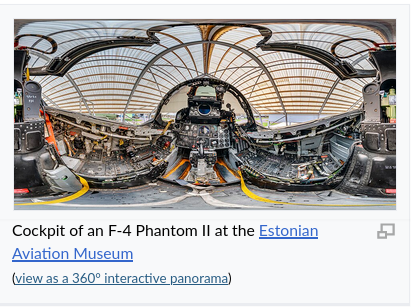 |
| Image credit: Lauri Veerde (CC-BY-SA 4.0) |
As you can see, the image shown has significant distortions. This is because the image is a sphere being projected on to a rectangle. Its impossible to flatten a sphere into a rectangle without distorting the image for the same reason you need a globe to show the true shape and size of the continents of the earth. This distorted view might be artistically cool but is not very useful for actually illustrating the topic at hand. You can of course click the link to go to a more proper rendering, but that requires an extra click which many readers won't do. It would be much cooler if a proper interactive view was embedded directly on the page.
Can we do better?
The external tool that is linked to for these images is called Pannoviewer. In turn, it is a wrapper around an open source library called Pannellum.
In theory that could be embedded directly into MediaWiki. TheDj did some work towards this back in 2019-2023. I'm not exactly sure what happened, but it seems like it didn't make it all the way to the end goal and work on it eventually petered out.
Getting new extensions deployed to Wikimedia as a volunteer is a Kafkaesque hell that I don't really want any part in. But is there an alternative?
Pannellum normally uses WebGL. However for browsers that do not support WebGL, it has a CSS based fallback mode using 3D CSS transforms. We can use CSS in Wikipedia templates. Can we make a perspective viewer as a pure template? No server code needed, no review needed, just a normal edit that anyone could make to Wikipedia?
Pure CSS viewer
Lets look at the fallback code in Pannellum, since that is the inspiration for this.
From https://github.com/mpetroff/pannellum/blob/master/src/js/libpannellum.js#L835-L856
            s = fallbackImgSize / 2;
            var transforms = {
                f: 'translate3d(-' + (s + 2) + 'px, -' + (s + 2) + 'px, -' + s + 'px)',
                b: 'translate3d(' + (s + 2) + 'px, -' + (s + 2) + 'px, ' + s + 'px) rotateX(180deg) rotateZ(180deg)',
                u: 'translate3d(-' + (s + 2) + 'px, -' + s + 'px, ' + (s + 2) + 'px) rotateX(270deg)',
                d: 'translate3d(-' + (s + 2) + 'px, ' + s + 'px, -' + (s + 2) + 'px) rotateX(90deg)',
                l: 'translate3d(-' + s + 'px, -' + (s + 2) + 'px, ' + (s + 2) + 'px) rotateX(180deg) rotateY(90deg) rotateZ(180deg)',
                r: 'translate3d(' + s + 'px, -' + (s + 2) + 'px, -' + (s + 2) + 'px) rotateY(270deg)'
            };
            focal = 1 / Math.tan(hfov / 2);
            var zoom = focal * canvas.clientWidth / 2 + 'px';
            var transform = 'perspective(' + zoom + ') translateZ(' + zoom + ') rotateX(' + pitch + 'rad) rotateY(' + yaw + 'rad) ';

            // Apply face transforms
            var faces = Object.keys(transforms);
            for (i = 0; i < 6; i++) {
                var face = world.querySelector('.pnlm-' + faces[i] + 'face');
                if (!face)
                    continue; // ignore missing face to support partial cubemap/fallback image
                face.style.webkitTransform = transform + transforms[faces[i]];
                face.style.transform = transform + transforms[faces[i]];
            }
The first thing to notice, is instead of working with an equirectangular projection, it instead uses a cubemap representation. This is where the 360° panorama is represented as a cube that has 6 faces. We can't convert the spherical representation into a cube with pure CSS since CSS only supports affine transformations. Thus we'll have to upload all the parts of the cube as separate files:
.jpg/960px-Eesti_Lennundusmuuseum._H%C3%A4vitaja_F-4C_Phantom_II_kabiin_(cubemap).jpg) |
| The same image of an F4 as before, but as the faces of a cube instead of an equirectangular projection Image credit: Lauri Veerde (CC-BY-SA 4.0) |
Imagine this as sort of an arts and craft project. If you print it out, take some scissors, and glue all the edges together, you get a cube. If you were inside the cube, you would get a full scene view. This is what we are going to do with CSS - separate the parts and glue them together with perspective shifted to give the 3D view effect.
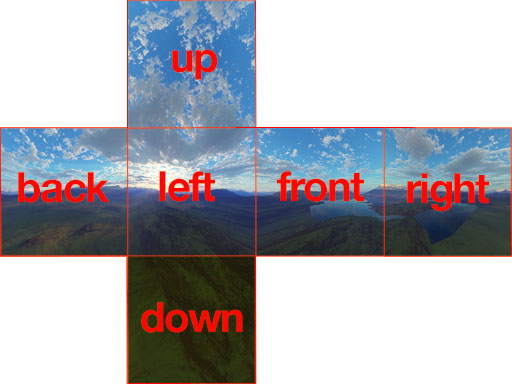 |
| The different faces of the cube labelled. Image credit: Arieee (CC-BY-SA 3.0) |
https://jaxry.github.io/panorama-to-cubemap/ is an easy to use website to do the equirectangular to cubemap conversion, but it tends to fail for large files. I've mostly been using Tim Starling's pano-projector, which is CLI tool that was part of an effort to bring panorama display to Wikimedia that hasn't come to fruition yet.
Once we have the 360° view converted to cube form, the idea is pretty simple. We apply 3D translations and rotations to make it in to a cube, and then we transform the viewing angle as appropriate to see the part of the image we want.
All this can be translated to a MediaWiki template fairly easily. It is a bit persnickety, firefox seems to have some weird tearing artifacts sometimes. Chrome is much smoother, but it has the very confusing issue that you need to put some sort of transform on any element overlapping a 3D transformed element, or it will disappear or reappear at random (Thank you stack overflow for explaining this to me).
We can even use CSS animations to give a rotating view.
The result is: https://commons.wikimedia.org/wiki/Template:Cubemap_player/doc#Example (My blog software messes with it so i only embedded a video here. Click the link for the full effect). The template code is a little gnarly; in retrospect I probably should have used lua instead of pure wikitext. But it works!
Enter {{calculator}}
This works but has some notable limitations:
- We use TemplateStyles for the animation. The animation needs to know where the image starts but TemplateStyles doesn't support being parameterized. Thus it is difficult to specify a starting yaw and pitch. I wrote a script that created separate stylesheets for some common values, but its an ugly solution that would be a pain if anything has to be changed. (I made a proposal for template styles to allow variables in calc() which should be secure and fix my problem, but I'm not holding my breath for it to actually happen)
- We use :target pseudo-class to implement buttons. That's basically all we got with core mediawiki, as we can't make checkboxes, and CSS is not really designed with the idea of clickable interaction in mind. Unfortunately that causes the page to scroll when clicked, and it really only lets us stop and stop the animation. It does not allow more complex controls.
Previously I was involved with a project to make a calculator gadget. The idea was to make widgets on a page plug into formulas (like a spreadsheet) to update other text on the page or CSS variables.
This is exactly what was needed for this project. Even better it was already enabled on Wikipedia, so I could just go ahead and use it. It lets us make a button that on click adjusts a CSS variable, which we can then use to change the displayed view.
With this we can make the previous template much more parameterized. You can specify any yaw, pitch or zoom you want as a starting point and I didn't have to make a separate stylesheet for every option (It uses CSS transitions instead of animation for the full rotation button). We can also have real buttons to move it left, right, up or down — no more sudden jumps on clicking play.
I even added drag support to {{calculator}} so you can control the viewpoint with your mouse (or finger). Unfortunately more complex gestures like pinch-zoom aren't viable, but dragging to change viewpoint really makes it come alive.
You can see the results at the [[McDonnell Douglas F-4 Phantom II]] article.
Conclusion
So far I've put the new template on a few pages. Thus far nobody has objected, so success!
There are still a few limitations. Most notably it requires users to upload the cube faces as separate images which is a bit annoying. On the bright side though, the different faces are usually usable images, albeit perhaps not framed in the most pleasing composition, so there is potential that they might be used independently. The biggest reason why this is an issue is it means only people who know how to extract the faces can use the template.
We can't do full screen or virtual reality mode (Where the viewer users the device orientation API to show the scene based on how the user holds their phone). Nonetheless we can still link to the external panoviewer tool for those usecases. Similarly pinch to zoom gestures do not work.
Another major limitation is we can't do dynamic level of detail loading. Ideally if the user zooms in, we should load a higher resolution tile of the part they are zoomed in at. That is not viable with the current approach. Instead we have to chose a resolution from the get-go and load only that. Too high and it affects page load speed. Too low and the image is blurry when zoomed.
In the future it might be interesting to investigate adding support for annotations or linked hotspots.
On the whole though, i think its a big improvement over the status quo, and a testament to what is possible with modern CSS and a smidge of Javascript.


